How to Stop Daily Digest Email
The Daily Digest email delivers a summary of your CRM activity — new leads, deal updates, and tasks — once per day. If you'd rather not receive it, you can turn it off in seconds.
Steps:
- Click your profile picture in the top-right corner of any page.
- You will land on your Profile page.
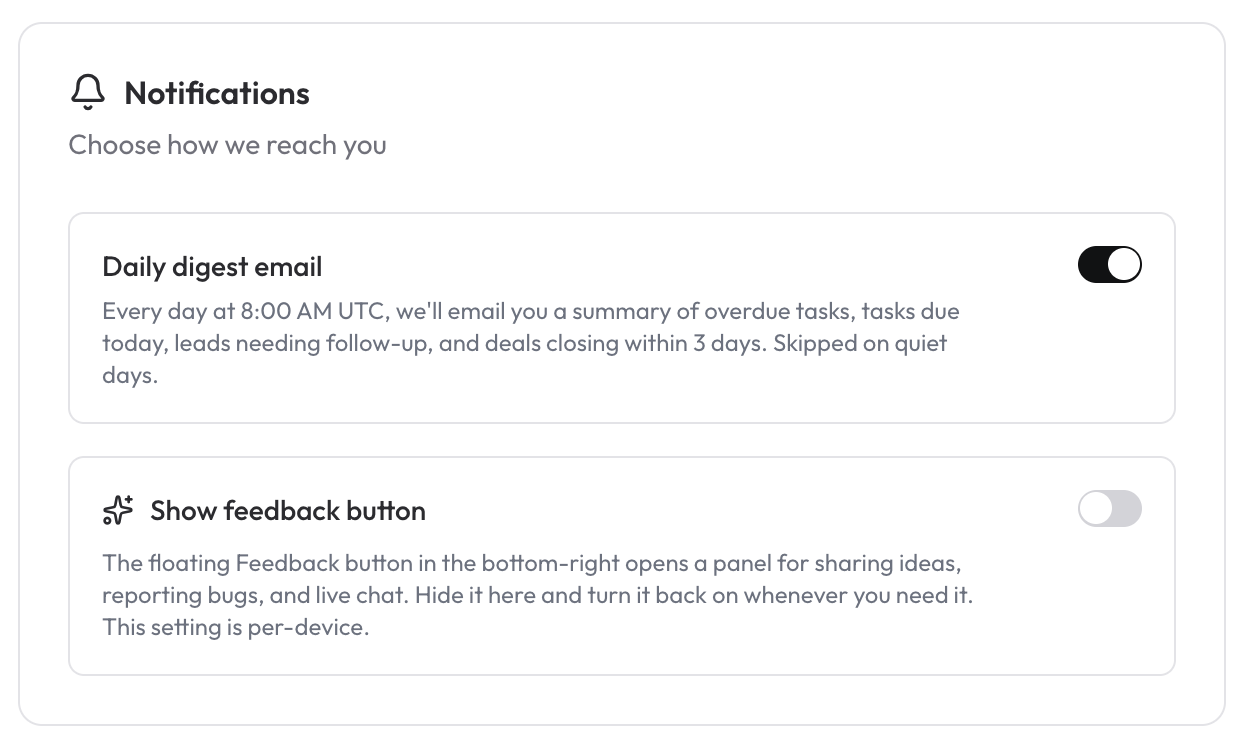
- Scroll down to the Notifications section.
- Toggle Daily Digest Email to the off position.
The change takes effect immediately — no save button required. You can re-enable it at any time by toggling it back on.
How to Show or Hide the Feedback Button
The Feedback button floats on every page and lets you send quick suggestions or bug reports to the team. If you find it distracting, you can hide it from the same Notifications section.
Steps:
- Click your profile picture in the top-right corner of any page.
- You will land on your Profile page.
- Scroll down to the Notifications section.
- Toggle Feedback Button to hide or show it.
Again, the change is instant and reversible.
Screenshot